
Embed Conversa in 5 minutes
If you can paste a script tag, you can ship Conversa on your live site. Most teams go from signup to a working widget in under five minutes because the dashboard walks you through the only steps that matter: create a chat bot, add knowledge, process sources, and copy embed code.
1) Create a chat bot
Sign in at Conversa and open Chat bots in your dashboard. Create a bot for your workspace, give it a clear name your team will recognize, and set the status to ACTIVE when you are ready for visitors to see it. You can keep it in draft while you upload sources, but the widget only answers on your website once the bot is active.
2) Add and process sources
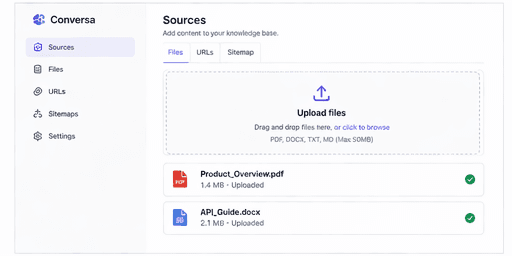
Go to Data sources for that bot. Upload PDFs, DOCX, or TXT files, add a public URL, or paste text such as FAQs and policy notes. Click Process so Conversa chunks and embeds your content. Without processed sources, the bot has nothing grounded to retrieve, so this step is worth doing before you embed.
3) Customize the widget (optional)
Under Customize, set colors, position, welcome message, and allowed domains so the chat feels native on your site. Restricting domains is a simple way to prevent the widget from loading on sites you do not control.
4) Embed on your website
Open Embed in the bot menu and copy the snippet. Paste it just before the closing </body> tag on every page where you want the bubble to appear (or once in a shared layout template).
<script src="https://www.conversa.ng/widget.js" data-bot-id="YOUR_BOT_ID"></script>Replace YOUR_BOT_ID with the id from your dashboard. After you deploy, open your site in a private window and ask a question you know is in your docs. If the answer looks right, you are live.
Troubleshooting
If the widget does not appear, confirm the bot is ACTIVE, your domain is allowed, and the script is on a normal HTML page with a body element (not only inside head). Clear cache after deploy. For WordPress or other CMS tools, use a “footer script” or “before body close” injection slot.
That is the full loop: knowledge in, script out, customers get instant answers while you sleep.